
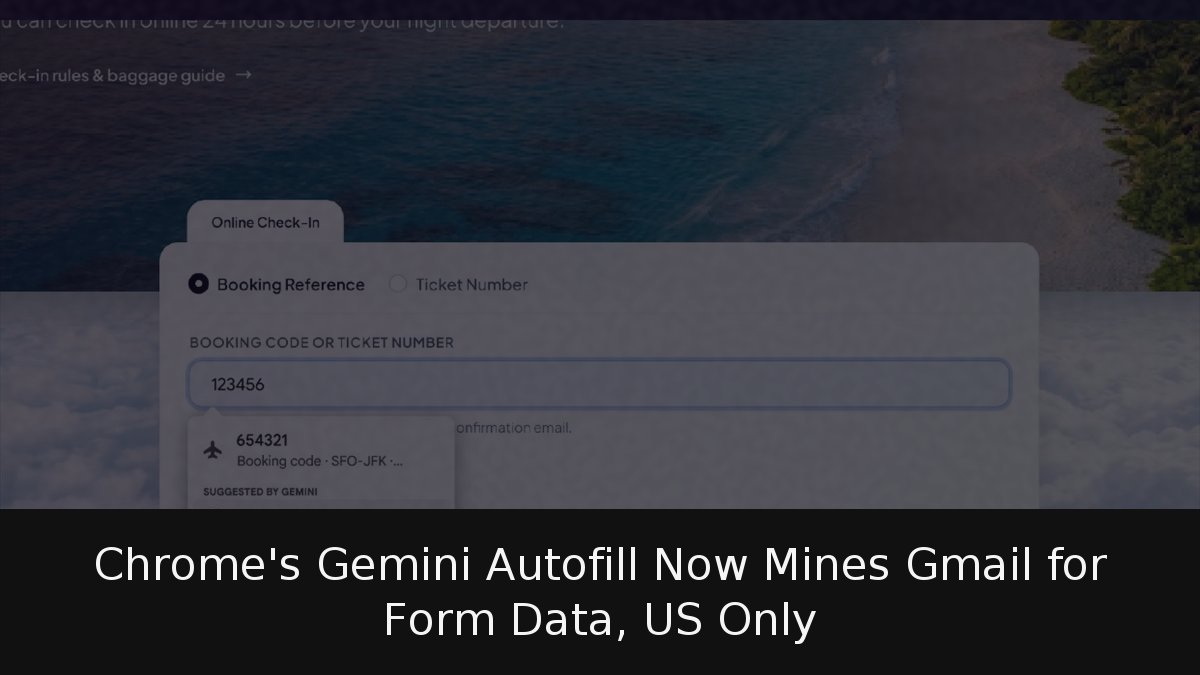
Google has quietly turned Chrome’s autofill into something closer to a personal assistant. As of October 28, the browser can reach into your Gmail inbox and surface details such as order numbers, package tracking codes and flight booking references whenever a web form asks for them. The feature, announced by Chrome product manager Amanda Lim, runs on Gemini through a capability called Personal Intelligence and is rolling out exclusively to users in the United States.
- What it does: Chrome suggests information pulled directly from Gmail — order numbers, tracking details and flight bookings — as you complete online forms.
- Who gets it: US users of Gemini in Chrome who have Personal Intelligence enabled, on desktop, Android and iOS.
- What’s next: Google says Google Photos will eventually feed the feature too, but has given no date.
How the enhanced autofill actually works
The premise is straightforward. Instead of opening a second tab, searching your inbox for an airline confirmation and copying a booking reference back into a check-in page, Chrome recognises what the form needs and offers the relevant detail under a “Suggested by Gemini” prompt. One click inserts it, and the round trip to Gmail disappears.
This sits on top of the standard autofill that already handles saved addresses, passwords and payment cards. Google’s announcement names only the three Gmail-sourced categories — orders, tracking and flights — as examples. Some coverage has suggested addresses, phone numbers and card numbers are also drawn from the inbox, but those remain part of Chrome’s conventional autofill, populated from data stored in the browser rather than scraped from email.
The feature is opt-in. Users can decide through Chrome settings whether enhanced autofill is active and what it is allowed to access, and individual suggestions can be dismissed. Google says sensitive data is encrypted, though it has not published technical detail on how that encryption applies to the Gmail content Chrome reads.
“You can manage whether enhanced autofill is enabled and what it can access via your Chrome settings. As always, sensitive data is encrypted and you remain in control,” Lim wrote in the announcement.
The privacy question Google left open
The announcement does not address whether Gmail data surfaced through autofill is used to improve Google’s models. That omission matters because Chrome’s general help documentation for enhanced autofill states that on personal accounts the feature is permitted “and AI models are improved,” with human reviewers able to read data for that purpose. Managed Workspace for Education and Chrome Enterprise accounts are allowed without model training.
That documentation predates the Gmail integration and does not mention email specifically, so it is not proof of what happens to inbox content here. But it is precisely the clarification Google should have provided on day one. The company has already revised its privacy policy, effective October 16, to allow personalised ads to draw on Gmail, Drive and Photos content when users make that data available to other Google services that support advertising.
The tension echoes an earlier Chrome change, when the browser began analysing suspected scam sites on Google’s servers rather than on the device. Convenience keeps expanding, and so does the volume of personal data passing through Google’s cloud.
No word on Europe, and a wider security debate
Google has not said when, or whether, the feature will reach other countries. The rollout is US-only and the announcement mentions no additional markets or languages. Enhanced autofill itself is not new: in November 2025 Google expanded it on desktop to cover passport numbers, driving licence details and vehicle registration plates.
The timing lands in a difficult stretch for Chrome’s AI ambitions. The browser has faced scrutiny over AI-related flaws serious enough to prompt a faster security update cycle, and Google has moved to block compromised security certificates following domain attacks. Handing a browser access to your inbox also widens the attack surface at a moment when instruction-injection attacks against email-reading AI agents are a documented concern.
For now, the practical takeaway is simple: the capability is opt-in, so users who are uncomfortable can leave it switched off. Those who enable it should first review what Personal Intelligence is permitted to reach and how Google says that data is handled. The convenience is real, but so is the trade — and Google’s silence on model training is the part worth watching as the feature spreads beyond the United States.